Timeline-Free Workflows. Delivery-Grade Exports.

You finish the mix. Sponable handles the delivery.

For mixers, sound designers and composers who deliver to picture. And for directors and creatives who like to see and hear the idea.

Everything between a finished mix and a finished delivery — the layback, the version sets, the loudness, the preflight, the export.

All without opening a timeline.

Buy Sponable — €59

Launch offer· for the first 50 licenses

Regularly €79.

Or try it first — the trial is the full app, no account needed.

One-time purchase · Apple silicon · macOS 26.1+

A real Magic Match run: video and audio files are paired in Sponable and laid back automatically.

Put sound and picture together. Beautifully.

Laying audio against picture has been fiddly ever since QuickTime 7 went away. (We’re still not over it.) Sponable makes it simple again: two clicks, a few seconds, and your mix sits under the film as a ready-to-send file.

And if the picture doesn’t need changing, Sponable doesn’t re-encode it.

Your approved master stays your approved master.

Need more than a straight layback? Run the video’s sound through up to six of your favorite insert effects (Audio Units) before the mixdown, and land it at exactly the loudness the destination expects.

Every tool here works on its own. They just happen to fit — what one writes, the next one takes.

The Sponable main window with an empty drop zone.

Magic Match

Picture update? Your mixes already know where to go.

New cuts arrive — but your mixes were finished yesterday. Point Magic Match at your mixdown folder and the new picture versions, and it hands back the laybacks: every mix on the right cut, ready to send.

Magic Match never silently guesses. It reads durations, filenames, version hints, timestamps and black frames.

v3 audio belongs to v3 picture — even with newer-looking files sitting right beside it.

Anything ambiguous stays visible, with the most likely matches suggested. You confirm — or take over by hand.

The Magic Match panel with drag, selection and the inspector.

Magic Hook — music placement for picture

Magic Hook

Thirty tracks. One film. Every song where it starts to work.

Drop a folder of thirty tracks onto a video and get thirty previews back, each one cut in at that point.

Magic Hook analyzes each track — musically, not just technically — and places it at that moment, not at the first downbeat it finds.

And the track you pick isn’t a dead end: lay it back right there, or stack it under an edit’s Sound and Voice stems and deliver the whole thing in one pass.

  • Two engines, fast and ultra-precise — calibrated across a wide range of genres
  • Optional loudness matching, so thirty different masters come out sounding like one session
  • Ready-to-share previews for every track

No timeline. No bouncing.

Magic Hook while music files are dragged from Finder into Sponable.

Magic Stems

Stem separation, one right-click. Vocals from the instrumental.

Magic Stems is a Local Intelligence stem splitter: right-click a music file in Sponable and choose “Separate Vocals + Instrumental”. Everything runs on your Mac’s Neural Engine — no cloud, no per-track fee, no internet connection needed.

A latest-generation RoFormer model. Training-free multi-step refinement.

The result lands as a Stack Sum right where the file was. The original stays untouched. Select twenty tracks, click once, and the batch runs through on its own — no dialogs, no model to pick.

Later this yearMulti-Stem: every instrument on its own track. It doesn’t invent instruments: only what’s actually in the song appears.

Stack Sum

Stack it up. Sum it down.

Build a demo mix on any audio file: add music, sound design, voiceover or dialogue — up to 32 tracks under one main track.

An AAF’s Music, Sound and Voice stems arrive here already stacked. Build as many stacks as you need, then lay every mix against picture in a single pass.

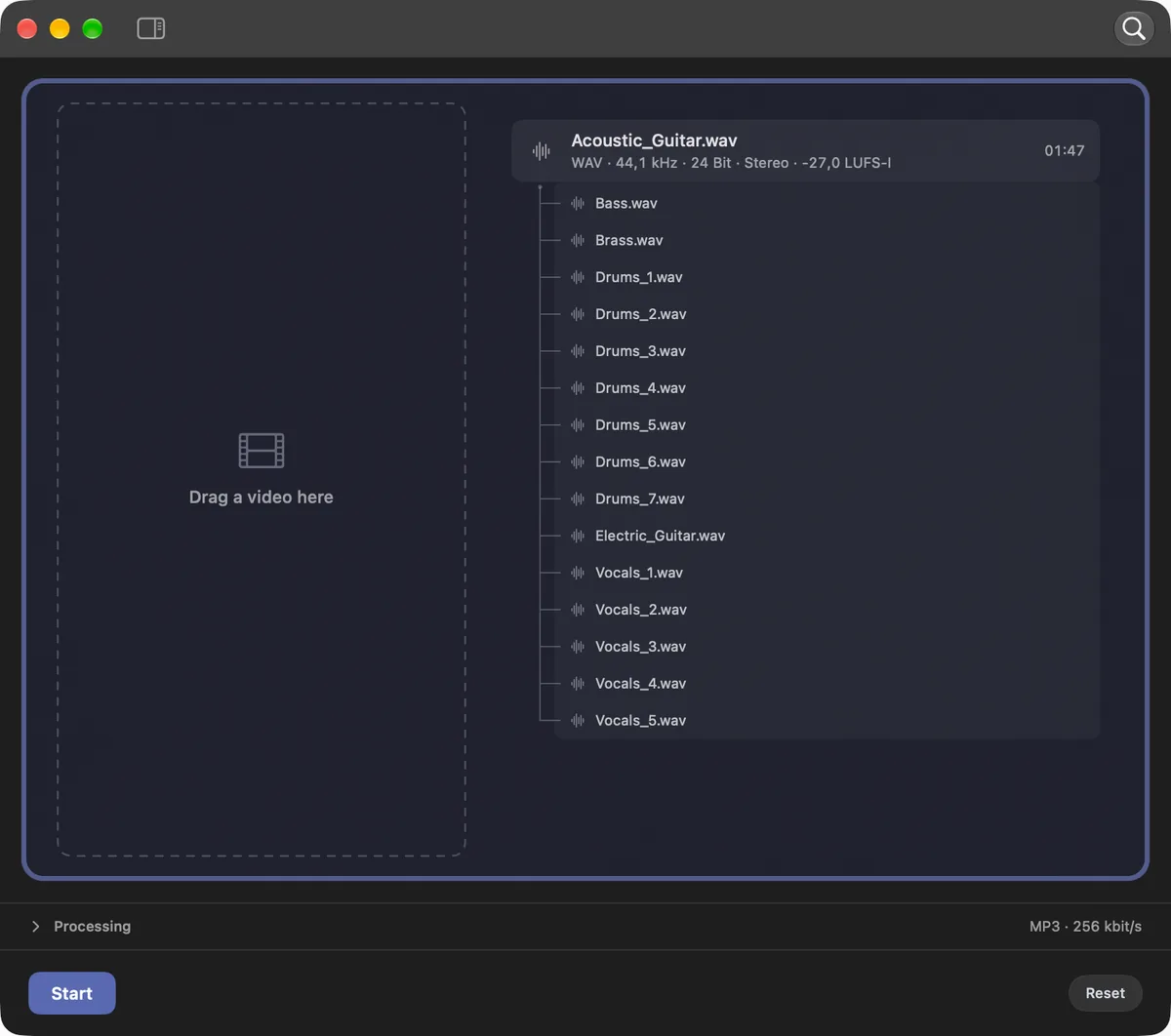
The Stack Sum view in Sponable, dark mode: Acoustic_Guitar.wav as the main track with fifteen stems — bass, brass, drums, electric guitar and vocals — stacked beneath it, next to an empty video drop zone.

Delivery — loudness, downmix and preflight

Loudness

Loudness to spec. One click.

Pick the destination, drop the files, done. No looking up the spec, no measuring each file afterwards.

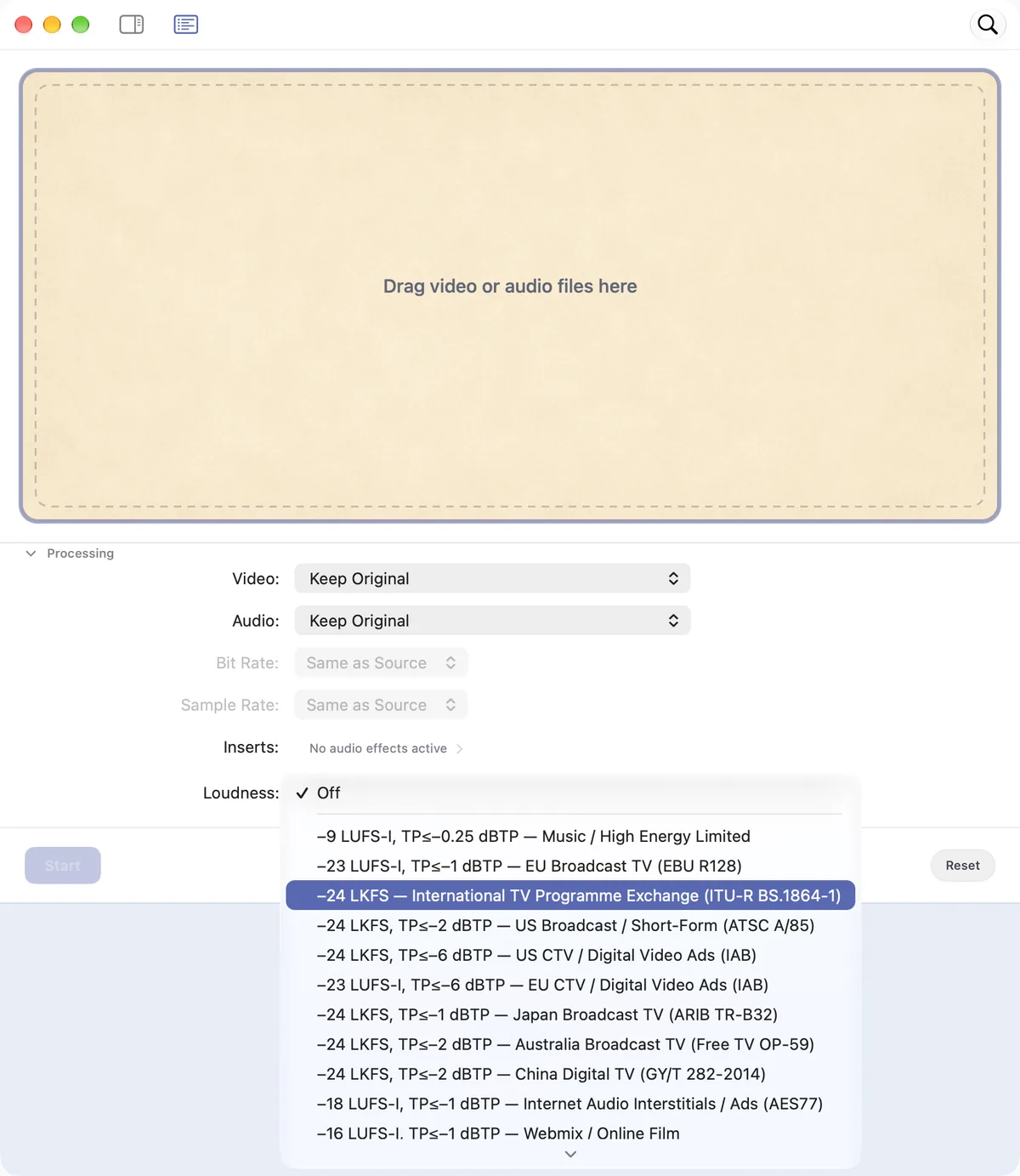
The presets carry the numbers: EBU R128, ATSC A/85, CTV, digital video ads, web mixes, social, Spotify, Amazon Audio Ads and podcasts. Custom LUFS targets are one field away, and Sponable shows LUFS and RMS for every file at a glance.

And when a music track just needs to be loud, Music / High Energy Limited gets it there — loud and controlled, with transparent true-peak protection.

That true-peak stage detects inter-sample peaks at 4× oversampling, keeps channels coupled up to 7.1 — so the stereo image doesn’t move — and runs at over 300× real time.

The loudness menu open in Sponable, showing the available delivery targets.

Downmix

Surround in. Stereo out. By the book.

Hand Sponable a 5.1 or 7.1 mix and it folds down to ITU-R BS.775: center and surrounds into the fronts at −3 dB, LFE left out.

Lo/Ro or matrix-encoded Lt/Rt — with a true Hilbert transformer, not a polarity flip.

Integrated loudness is measured on the source and again on the fold-down, so the level change is a number you can read, not an assumption.

The only gain Sponable applies is one constant attenuation across every channel, and only when the fold would otherwise overload — which is why nothing here needs a limiter.

A finished mix is allowed to get quieter. It is not allowed to sound different.

Six mono files land as one 5.1 entry — Sponable recognizes the set, not the pile.

And the fold pulls double duty: Cinema Upmix, one section down, is checked against exactly this math — same fold, other direction.

What the fold reports: Lc/Rc and the side and rear surrounds folded at −3 dB each, the LFE measured for unique content and left out per Dolby, and for Lt/Rt the surrounds shifted 90° and summed out of phase. Phase alignment runs per band as comb-filter protection, and the note tells you in how many bands it took effect.

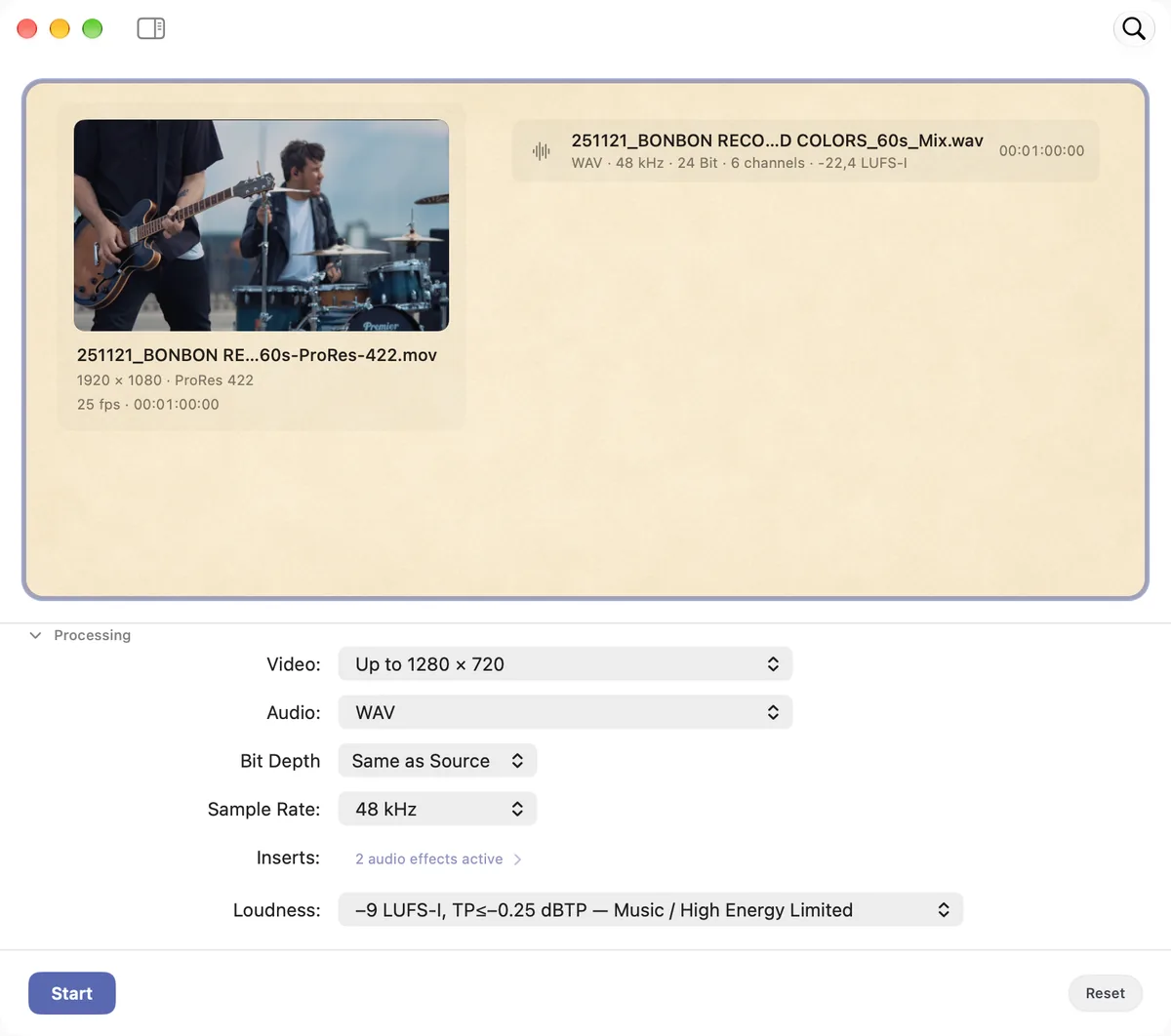
A six-channel mix recognized as one entry in Sponable, set to fold down to stereo.

Preflight

It catches the mistakes you make at 2 a.m.

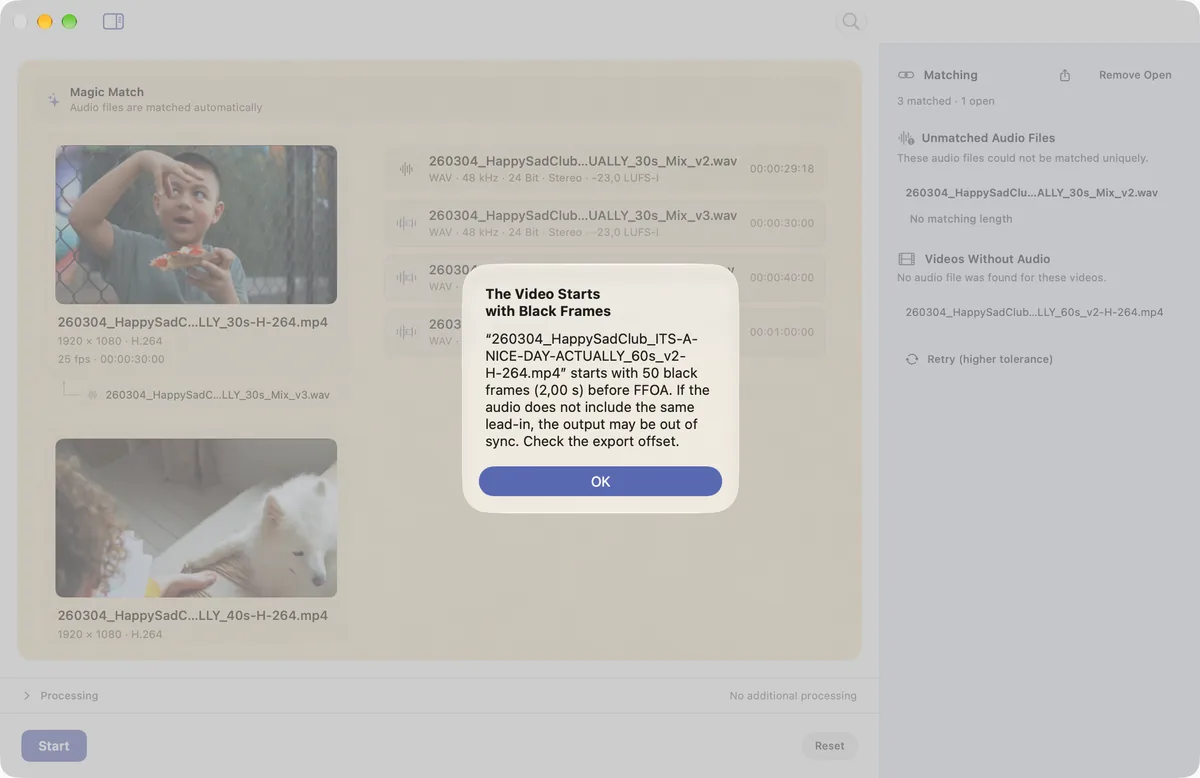
Before a sensitive delivery, Sponable warns you about the classic end-of-session slips: lead-in black frames you might have missed, a file that accidentally went mono, or a runtime that’s off by a hair.

Tolerances are adjustable. Warnings can be silenced.

But they’re there when it counts.

The Sponable dialog explaining detected black frames, over the dimmed main window.

Cinema Upmix

The upmix that shows its work.

A finished stereo master goes in, a discrete 5.1 or 7.1 set comes out — and it still sounds like your mix. Dialogue holds its place. The surrounds carry diffuse content only. The center exists only where the material really is centered, and what moves into it comes out of the left and right, not on top of them.

No artificial reverb. No front-to-rear delay. No gratuitous top-end lift.

How the fold is measured7 paragraphs

A conventional upmixer spreads stereo across more speakers. Sponable analyzes the whole program first — coherence, diffuse content, syllabic modulation, band energies — and decides center, surrounds and LFE from what the material is made of.

Downmix-compatible by design.

Fold the finished 5.1 or 7.1 back to stereo — the same BS.775 fold from the downmix section above — and you land on your original master. And you don’t have to take that on trust: the QC report carries the broadband deviation, the worst third-octave deviation and the correlation against the source.

“Bigger” never gets to mean “different.”

Natural stays close to the master, Cinematic opens the room further — same guardrails. Out comes a discrete cinema deliverable: six or eight mono files at 48 kHz / 24-bit with the QC report next to them, tested on programs up to three hours.

One right-click. One destination. No session. No surround panner.

It’s exactly what Sponable’s DCP builder takes next.

Short jobs run in memory, long ones switch to the streaming path automatically — same DSP, without a mountain of temporary files. Two runs with the same settings produce bit-identical files.

Stay under the ceiling. Leave the mix alone.

Cinema loudness is a ceiling, never a target. Choose Advertising / Pre-Show or Trailer, and Sponable measures the complete program with its Leq(m) cinema weighting against it.

Below it?

Nothing happens.

What happens above the limit3 paragraphs

When attenuation is required, it’s one coherent gain across every channel, LFE included — so balance, dynamics and imaging stay exactly where you put them. Feature-film mode leaves the program level alone.

No compression. No per-channel normalization.

Optional Leq(m) Contour is off by default. It runs before measurement, and the report states what it did to the Leq(m) — the same program is rendered once without it for comparison. Every export is measured again after writing, and every channel is checked for clipping.

Digital Cinema Package

From your mix to the projection booth.

Select one video and one 5.1 or 7.1 asset — the set Cinema Upmix just wrote, or discrete files of your own — choose Create DCP, and Sponable builds a complete SMPTE Digital Cinema Package locally on your Mac, verified before the folder gets its final name.

JPEG 2000 picture.
MXF picture and sound.
CPL. PKL. ASSETMAP.

What the package contains4 paragraphs

A short sheet asks for title, content type, language and territory, and shows the ISDCF composition name exactly as Sponable will write it.

No naming spreadsheet. No external packaging utility. No round trip through another app.

Your picture gets the same restraint as your audio: 1920 × 1080 stays 1920 × 1080, placed 1:1 in the middle of the Flat container. 24 and 25 fps stay native; 23.976 is conformed to 24 automatically, picture and sound together, which lifts the pitch by about 1.7 cents — below what anyone hears.

Choose Standard (SMPTE) or Maximum Compatibility for older installations. Channel assignment follows ST 428-12 / ISDCF Doc 4, and package verification runs against the files Sponable actually wrote — not against what the software intended to write.

Finished means finished.

Sponable treats the last step like a production step.

A delivery only appears once processing and verification are complete.

Cancel a job or hit an error and a half-written export doesn’t pretend to be the finished one.

The point isn’t just to make the file. It’s to know what left the machine.

AAF & OMF

The edit’s audio, without the edit.

Drop an AAF or OMF in and ready-to-use audio comes out — already sorted into Music, Sound and Voice.

No timeline, no DAW project built just for one WAV, no source files loaded one by one. The three stems land as a stack, and together they add up to the file you were sent — Sponable verifies that before it hands them over.

Export it as one temp mix, as the three stems — or both.

Swapping stems, fades and stereo pairs7 paragraphs

Sum the stack as it is. Or pull the Music stem, drop a different track in its place, and sum again — new score, same edit. And if the new music still needs its spot against picture, that’s Magic Hook’s job — one drop away.

Every event lands exactly where the editor placed it. The edit stays the editor’s.

What it does fix are the technical things that shouldn’t make it into the render: where a missing fade would click, it writes one. Cuts that would pop become crossfades, just long enough to disappear. And when the edit runs hot, the true-peak limiter catches what would clip — on playback or in the sum — without losing the idea or the energy.

Events that belong together — a left/right music pair, a split atmo — are recognized as stereo pairs and panned as pairs.

Or take the tidied edit back to your DAW — as an AAF.

The sorting, the safety fades, the stereo pairs — that’s housekeeping you’d otherwise do by hand. So Sponable hands the edit back as an AAF, not only as a stack: export it, open it in your DAW, and the tidying is already done.

These stems are no special case: the full insert chain, every loudness target, every export format and sample rate. Everything Sponable does elsewhere, it does here.

Process the batch, not every file.

Build an Audio Unit chain once, place it exactly where it belongs in the signal path, and run the entire batch through it.

Denoising, your favorite compressor, intelligent EQ, voice filters — one pass, every file.

Plugins and loudness matching, before or after summing — your call.

Formats and proxies — video and audio conversion

Speaks fluent post-production.

Convert between the formats your pipeline actually uses — H.264, ProRes, Photo-JPEG and DNxHD.

Swap soundtracks, generate editor- and DAW-friendly proxies, and turn oversized PCM files into compact delivery formats without leaving Sponable.

On the audio side that includes the free formats — Ogg (Vorbis), Opus and FLAC — alongside WAV, AIFF, CAF, MP3 and M4A/AAC, which picks its profile to match the material: AAC-LC up to 48 kHz, HE-AAC for 88.2 and 96 kHz.

Quick Drop with the import list and the format menu open.

Untouched First.

No data reduction.
No format conversion.
No sample-rate conversion.
No bit-depth reduction.

Processing happens when the workflow needs it or you ask for it — otherwise approved files pass through losslessly and land on picture as-is.

When processing does happen, it runs in 32-bit float on a 64-bit summing bus, with an ultra-transparent true-peak limiter stepping in only when necessary.

Even internal metering runs in the native sample-rate family — as if dedicated 44.1 and 48 kHz DSPs were working under the hood.

For the engineers: the summing bus preserves signal down to −149 dB, memory and streaming paths are bit-identical at any project length, and the limiter’s ceiling is mathematically guaranteed — below it, exactly zero samples are altered.

No cloud. No uploads. No training.

Your audio never leaves your Mac. It isn’t uploaded, isn’t stored anywhere else, and is never used to train anything — ours or anyone’s. (Not our business model.)

Carefully tuned algorithms, honest signal processing — and where a model helps, as in Magic Stems, it ships inside the app and runs on your Apple silicon. It learns nothing from your files. What you process stays yours, and it stays here.

The intelligence is local. So is your audio.

The small comforts — MiniQuickDrop, Quick Look, presets

For the way you actually work.

  • MiniQuickDrop — the whole app condensed into a small floating drop window, made to sit next to your NLE or DAW. Files process the moment they land — and with Force Field on, one file stays put while everything you drop pairs with it instantly.
  • Quick Look everywhere — press space to make sure it’s really the right file, anywhere in the app.
  • Presets for every workflow — save as many as you like. We’re not counting.
  • Jobs, not modal dialogs — keep work moving while another task processes or waits for your decision.

And more: automatic cover art and tags on exports, configurable warnings and per-workflow routing.

The MiniQuickDrop widget between the macOS calendar, weather and battery widgets, going from waiting to completed as a file is dropped on it.

Native on the Mac. Actually native.

Apple silicon. macOS Tahoe 26.1 or later.

No compatibility layer. No browser shell.

Just a Mac app built around fast batch workflows and the conventions your hands already know.

Sponable. €59.

Launch offer· for the first 50 licenses

Regularly €79.

One-time purchase. That’s the whole pricing page.

Not sure yet? Download the trial — the full app, no account needed.

Apple silicon · macOS 26.1+

2 Macs per license · Updates included

FAQ

Does Sponable re-encode my files?

Only when a conversion is required — or when you ask for one.

Otherwise: Untouched First.

For soundtrack replacement, the approved picture is carried through without a new encode wherever the workflow permits.

Does Sponable upload my audio?

No.

All processing happens locally on your Mac.

What happens when Magic Match isn’t sure?

It keeps the ambiguity visible, suggests the most likely matches and waits for you.

It never silently guesses.

Which video formats does Sponable support?

For soundtrack replacement: formats macOS can decode — H.264, HEVC (10-bit included), the ProRes family up to 4444 with alpha, DNxHD and DNxHR.

Containers: MOV, MP4, M4V and MXF. MXF can be losslessly rewrapped to MOV.

For conversion and proxies: H.264, Photo-JPEG, ProRes 422 and DNxHD/DNxHR, in MOV or MXF.

One exception to untouched-picture handling: Extend with Black requires H.264 and HEVC picture re-encoding. ProRes and DNxHR can keep the original essence. Freeze Last Frame keeps the master untouched.

Which audio formats does Sponable support?

In: WAV, AIFF, CAF, MP3, M4A and AAC — mono through 7.1. Plus AAF and OMF, rendered to WAV.

Out: retain the original where possible, or create WAV, M4A/AAC, MP3, G.711 µ-law or A-law.

For M4A/AAC, Sponable picks the profile to match the material: AAC-LC up to 48 kHz, HE-AAC for 88.2 and 96 kHz.

And the free formats — Ogg (Vorbis), Opus and FLAC — work in both directions.

WAV supports 8-, 16-, 24-bit and 32-bit float, with sample rates from 44.1 to 192 kHz — or matched to the source.

Multichannel is folded, not truncated: 5.1 and 7.1 come down to stereo per ITU-R BS.775. And it works the other way around: Cinema Upmix opens a stereo master into a 5.1 or 7.1 set of discrete 48 kHz / 24-bit mono files.

Quantization happens exactly once: Sponable computes in 32-bit float throughout, converting to the target bit depth only at the very end, with TPDF dither. No intermediates, no second rounding.

TPDF at ±1 LSB from a cryptographically seeded, uninterrupted stream per file; the quantization itself computed in 64-bit double. Optional 16-bit noise shaping after Lipshitz/Vanderkooy — 5th order, E-weighted — pushes quantization noise 14 dB down where hearing is most sensitive.

Can Sponable render AAF and OMF files?

Yes — and it goes further than a render: the edit comes back sorted into Music, Sound and Voice stems that together add up to the file you were sent. Export it as one temp mix, as the three stems, or both — rendered to WAV, and from there into any audio format Sponable writes.

Missing fades and clicky cuts are fixed on the way, stereo pairs stay pairs, and over-hot events are corrected by the true-peak limiter. The tidied edit can also go back out as an AAF, ready to open in your DAW.

The stems take everything Sponable offers elsewhere — the full insert chain, loudness targets and sample rates.

Can Sponable create a surround mix from a stereo master?

Yes.

Cinema Upmix analyzes the complete master first — dialogue, music, ambience and effects are not forced through the same spatial recipe — then builds center, surrounds and LFE from what it finds.

Natural and Cinematic offer two spatial attitudes with the same guardrails.

Is the Cinema Upmix downmix-compatible?

Yes. By design.

Every upmix is built around a reference stereo downmix: fold the 5.1 or 7.1 back to stereo and you land on your original master. The QC report shows how close — broadband deviation, worst third-octave deviation and correlation against the source.

The surround version gets bigger without breaking the stereo version.

Can it handle feature-length material?

Yes.

Short programs use the fast in-memory path; longer cinema jobs switch to Sponable’s streaming architecture automatically — tested with programs up to three hours, without filling your drive with temporary files.

Does the upmix stay within cinema loudness limits?

With Cinema Loudness enabled, Sponable measures the program against the selected Leq(m) ceiling.

Below it, nothing happens. Above it, one coherent attenuation across the complete multichannel mix.

It never raises a program toward the ceiling.

Can Sponable build a DCP?

Yes.

Select a video plus a 5.1 or 7.1 asset and Sponable creates a complete SMPTE Digital Cinema Package locally: JPEG 2000 picture, MXF picture and sound, CPL, PKL and ASSETMAP — named to the ISDCF convention and verified before publishing.

Which Macs does it run on?

Any Apple silicon Mac running macOS Tahoe 26.1 or later.

Is Sponable a subscription?

No.

€59. One-time purchase.

Launch price for the first 50 licenses; regularly €79.

What happens after I buy?

You check out through Lemon Squeezy and receive a license key. Trial and full version are the same download, so the key simply unlocks the app you already have.

Nothing to reinstall.

How many Macs can I activate?

Two.

One license covers two of your Macs.

Are updates included?

Yes.

Updates are included in the one-time purchase.

An audio nerd under the hood. Easy to be around.

Sponable thinks like a mastering engineer: with care, and without ever coloring your files.

When something is ambiguous, it asks.

When nothing is, it simply does its job.

You finish the mix. Sponable handles the delivery.