Timeline-Free Workflows. Delivery-Grade Exports.

You finish the mix. Sponable handles the delivery.

For mixers, sound designers and composers who deliver to picture.

Match mixes to video versions, set loudness and export the batch — without opening a timeline.

Regular price €79. Current price €59.

20 free exports · Every feature · No account.

Apple silicon · macOS 26.1+

One-time purchase · 2 Macs · Updates included

A real Magic Match run: video and audio files are paired in Sponable and laid back automatically.

From finished mix to finished delivery.

  1. Match

    Drop in your mixes and picture versions. Review the pairings in Magic Match.

    Watch the matching run
  2. Set

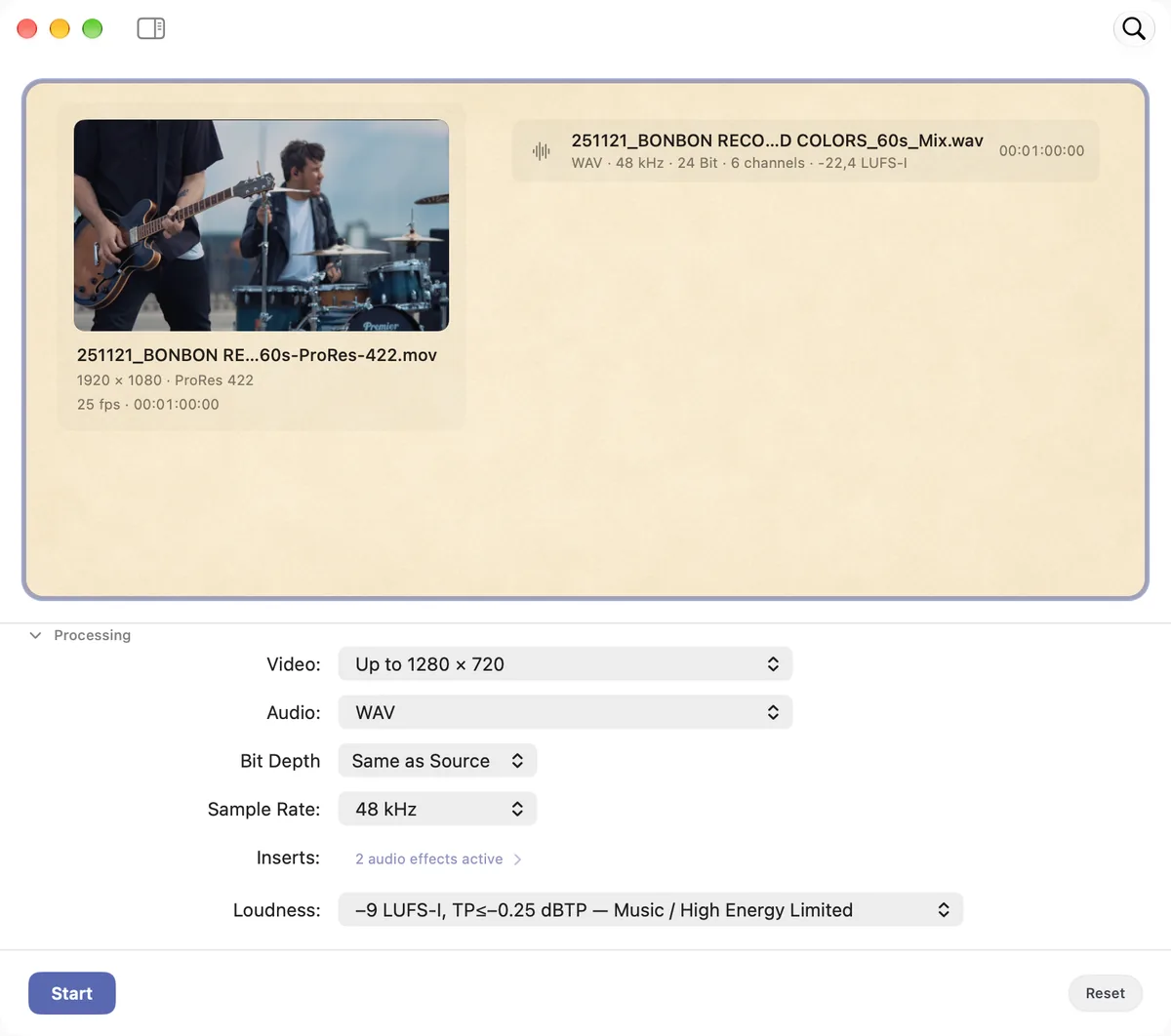
    Choose your output settings and a loudness preset, or set a custom target.

    See the loudness settings
  3. Export

    Export the batch. Check the results before you send them on.

    Follow the workflow

Magic Match

The right mix on the right picture.

Drop in your mixes and picture versions. Magic Match pairs them using duration, names, version hints and folder context. If a match is uncertain, Sponable shows you why and leaves the decision to you.

Confirm the pairings, choose your output settings and export the batch. You can also assign files by hand.

For a straight soundtrack replacement, Sponable carries the picture through without re-encoding where the format and workflow allow.

The Magic Match panel with drag, selection and the inspector.

Untouched First.

  • No video re-encoding.
  • No data reduction.
  • No format conversion.
  • No sample-rate conversion.
  • No bit-depth reduction.

Processing happens when the workflow needs it or you ask for it — otherwise approved files pass through losslessly and land on picture as-is.

Lay the final mix onto the approved online master, keeping the picture untouched — no return to the online suite just for audio layback. When picture and sound meet the delivery spec, the combined file is ready for final QC and handoff.

When processing does happen, it runs in 32-bit float on a 64-bit summing bus, with an ultra-transparent true-peak limiter stepping in only when necessary.

Even internal metering runs in the native sample-rate family — as if dedicated 44.1 and 48 kHz DSPs were working under the hood.

Magic Hook — music placement for picture

Magic Hook

Hear your music shortlist against picture.

Drop several music tracks onto a shorter video. Magic Hook finds a musical entry point for each track and fades it to the end of the picture, creating previews you can share.

Choose Fast or Precise music analysis and optional loudness matching. Each preview plays a continuous section of the track.

Same cut. Different chemistry. Keep the track you like, or combine it with the edit’s Sound and Voice stems below.

Magic Hook while music files are dragged from Finder into Sponable.

AAF & OMF

Turn the edit’s audio into a working mix.

Get a full mix and separate Music, Sound and Voice stems from an AAF or OMF. Unclassified material goes into Other; only categories present are created.

The stems arrive as a stack. Replace the music, keep the dialogue and effects, then make a preview — without building a DAW session just for a temp mix.

Sponable checks that the stems sum to its full-mix render and reports missing media or unsupported edits.

Since Sponable has already unpacked your AAF or OMF, it can also export a cleaned-up AAF for your DAW.

Messy turnover? Use Sponable as a cleanup pass before your DAW: relink external media and choose to mute or remove duplicate audio, silent clips and leftover guide mixes. Less housekeeping. More mixing.

Magic Stems

Need the instrumental? Get exceptional stem separation.

Right-click a mono or stereo music file to separate Vocals + Instrumental. The parts arrive as a stack for separate export or further processing; the original file stays untouched.

Select several tracks to run a batch. Separation runs locally on your Mac.

Later this year Advanced individual instrument separation, built to match the quality you already get from Magic Stems.

Stack Sum

Stack it up. Sum it down.

Sum music, effects, dialogue and voiceover from a film mix —
or the individual tracks of a song.

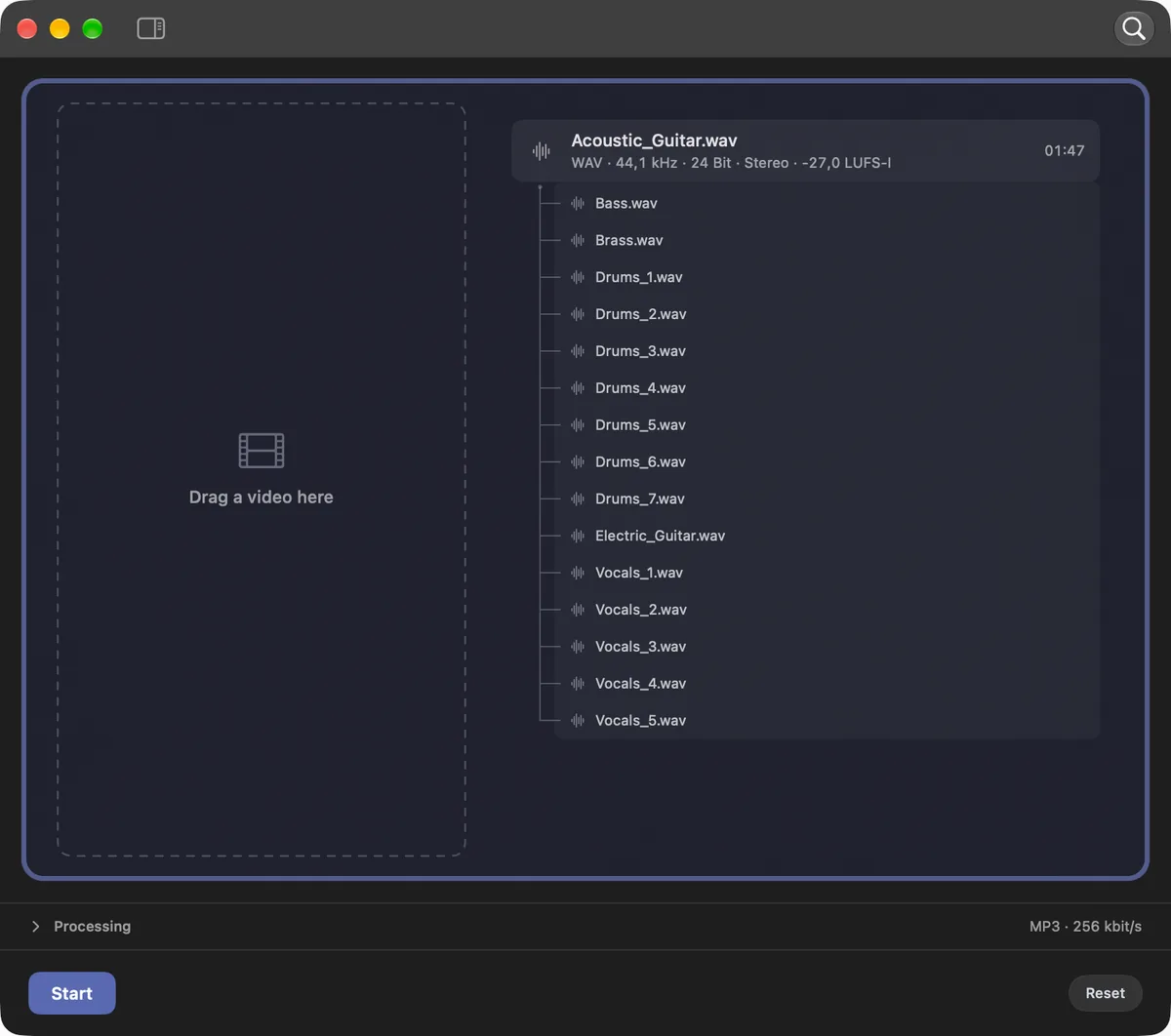
Layer audio files into a stack, or use the stems from an AAF/OMF import. Swap a layer and export the mix on its own or with picture.

All layers start together; the main track sets the duration.

Apply your inserts and loudness settings to the main track or the finished sum.

The Stack Sum view in Sponable, dark mode: Acoustic_Guitar.wav as the main track with fifteen stems — bass, brass, drums, electric guitar and vocals — stacked beneath it, next to an empty video drop zone.

Delivery — loudness, downmix and preflight

Loudness

Set the loudness. Export the batch.

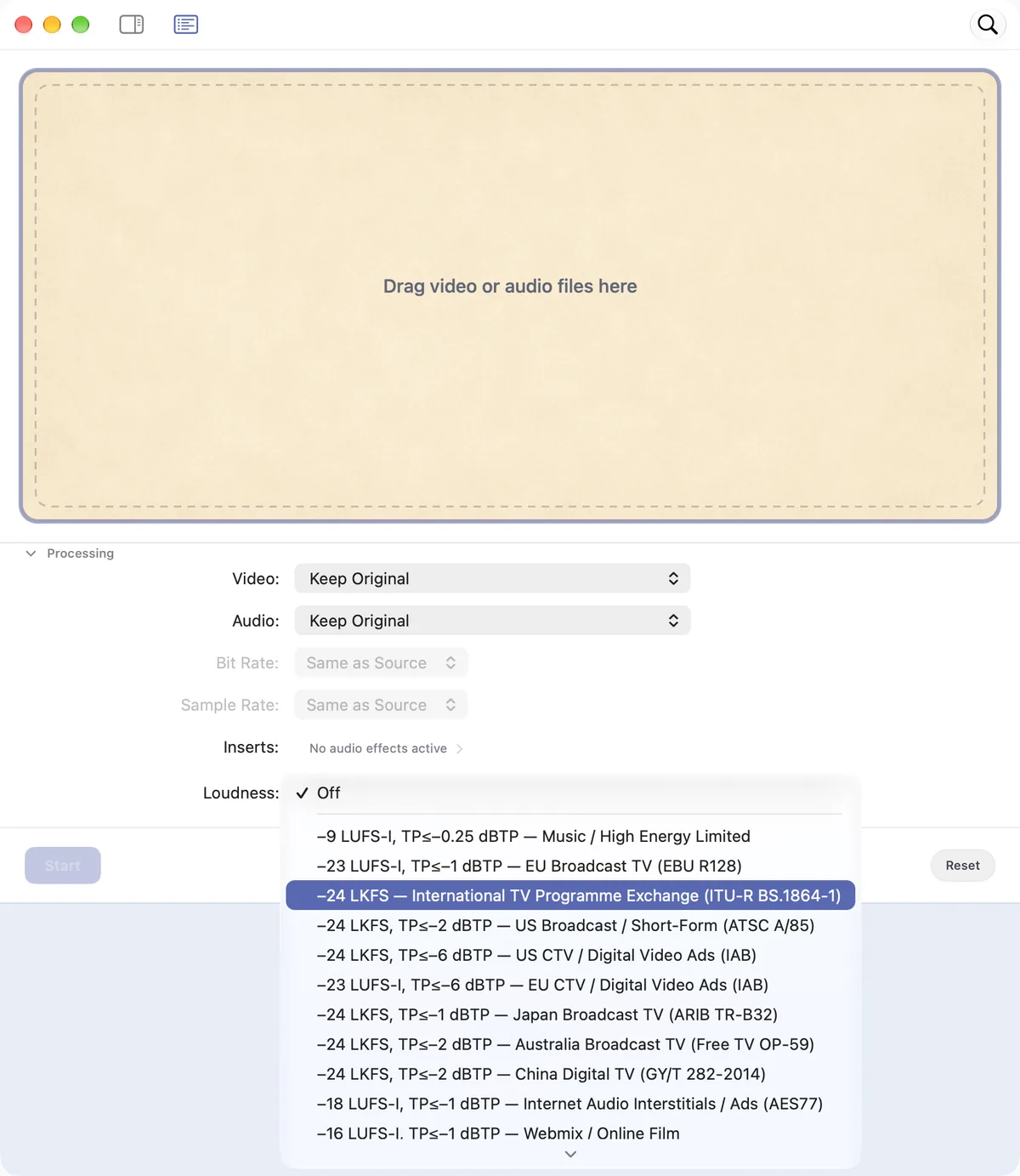
Choose a broadcast, web, social or audio-ad preset — or set a custom target. Sponable measures and adjusts the batch using the preset’s loudness and peak targets.

Keep the mix’s dynamics with constant gain, or choose a limited output. If the peak ceiling prevents a target being reached, the job tells you.

And when a music track just needs to be loud, Music / High Energy Limited gets it there — loud and controlled, with transparent true-peak protection.

The loudness menu open in Sponable, showing the available delivery targets.

Downmix

Surround in. Stereo out.

Turn 5.1 or 7.1 into a stereo delivery, with Lo/Ro or Lt/Rt fold-down. Sponable measures the source and result and protects the output from overload.

Drop any multichannel mix, interleaved or as a multi-mono set, and it appears as one surround file in the list — ready for matching, stereo-downmix or export.

A six-channel mix recognized as one entry in Sponable, set to fold down to stereo.

Preflight

Catch the slips before you send.

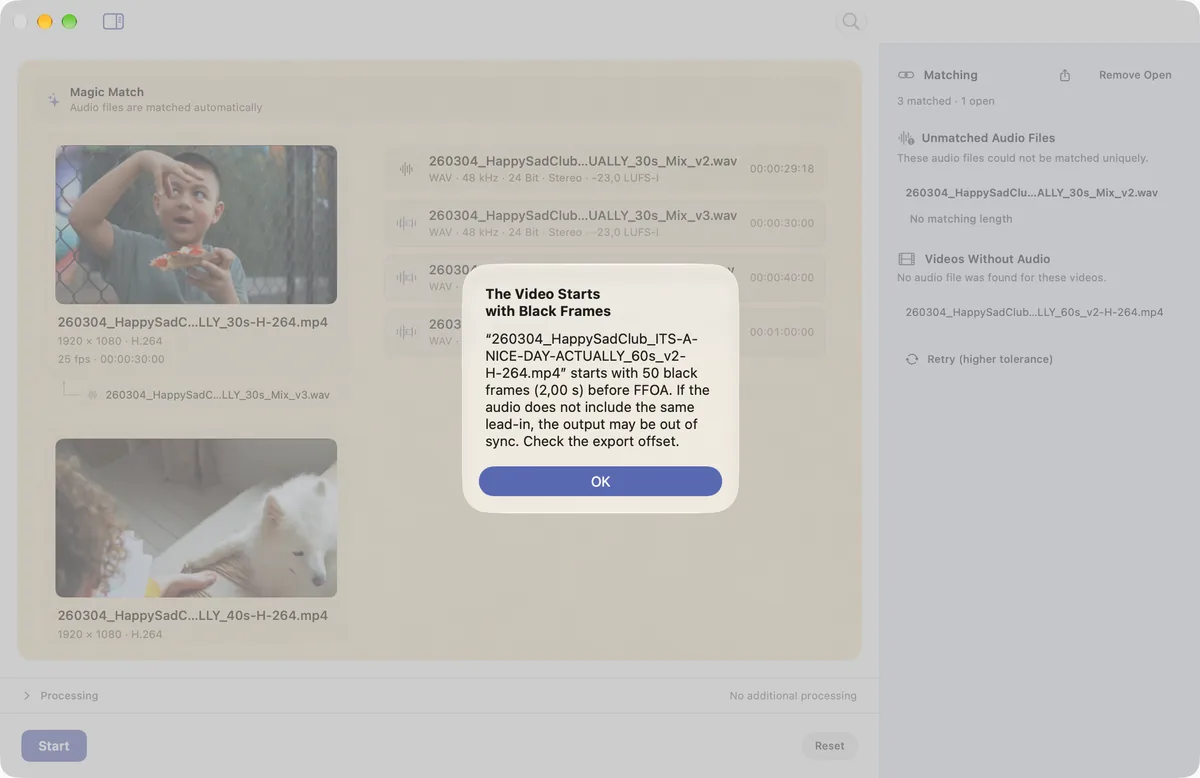
Black lead-in, unexpected mono, a length mismatch: Sponable flags the details that are easy to miss at the end of a session. Set tolerances to suit the job.

Better here than in the client’s inbox.

The Sponable dialog explaining detected black frames, over the dimmed main window.

Cinema delivery

Stereo to surround, with a QC report.

Cinema Upmix creates a discrete 5.1 or 7.1 set: six or eight mono WAVs at 48 kHz / 24-bit. Choose Natural or Cinematic; the report shows channel peaks, loudness and how the stereo fold-down compares with your source.

Cinema loudness

Choose Advertising / Pre-Show or Trailer, and Sponable measures the complete program using its Leq(m) cinema weighting, then checks the result against the selected target.

Use Leq(m) Contour to give your cinema spot more impact at the same Leq(m) level.

Digital Cinema Package

Take the next step to a cinema package.

Select a video and a 5.1 or 7.1 audio set — your own or a Cinema Upmix — to create a SMPTE DCP locally. Sponable builds the package, generates its ISDCF name and verifies the output files.

Formats and proxies — video and audio conversion

Speaks fluent post-production.

Replace soundtracks, create editing proxies or convert audio for delivery. Work with H.264, ProRes, Photo-JPEG and DNxHD/DNxHR, plus WAV, AAC, MP3, FLAC, Ogg and Opus.

Save your output settings as a preset for the next batch. Check format support.

Quick Drop with the import list and the format menu open.

Audio Effects

Your plugin chain, across the batch.

Bring your favorite Audio Unit plugins to every batch.

Process audio on its own, shape the summed mix of stems or individual tracks, or apply your chain while laying audio to picture.

Local processing

Your media stays on your Mac.

Audio and video are processed locally, including stem separation. Your files are not uploaded or used to train models.

For confidential cuts, unreleased music and the work you’d rather keep in the studio.

The small comforts — MiniQuickDrop, Quick Look, presets

For the way you actually work.

  • MiniQuickDrop processes files as you drop them. With Force Field, one mix or video stays loaded for the next version.
  • Quick Look everywhere — press Space to make sure it’s really the right file, anywhere in the app.
  • Presets for every workflow — save as many as you like. We’re not counting.
  • Jobs, not modal dialogs — keep work moving while another task processes or waits for your decision.

And more: automatic cover art and tags on exports, configurable warnings and per-workflow routing.

The MiniQuickDrop widget between the macOS calendar, weather and battery widgets, going from waiting to completed as a file is dropped on it.

Sponable

Regular price €79. Current price €59.

One-time purchase · 2 Macs · Updates included

Apple silicon · macOS 26.1+

20 free exports · No account.

Not for you? Tell us and you’ll get your money back.

FAQ

Why add Sponable to my existing tools?

Use it for the jobs around your mix: pair versions, audition music against picture, combine stems and make the delivery files. Those steps share one window and reusable settings, so a new preview needn’t become another DAW or editing project.

Does Sponable re-encode the picture?

For soundtrack replacement, the picture passes through without re-encoding where the format and workflow allow. Conversion, scaling and DCP creation require encoding.

Extend with Black re-encodes H.264 and HEVC picture. ProRes and DNxHR can retain the original essence; Freeze Last Frame keeps the master untouched.

Which video formats can I use?

Soundtrack replacement supports MOV, MP4, M4V and MXF with decodable H.264, HEVC, ProRes, DNxHD and DNxHR picture. MXF can be rewrapped to MOV without picture conversion.

Conversion and proxies include H.264, Photo-JPEG, ProRes 422 and DNxHD/DNxHR. Output containers depend on the codec: PCM audio requires MOV rather than MP4.

Which audio formats can I use?

Import WAV, AIFF, CAF, MP3, M4A/AAC, FLAC, Ogg (Vorbis) and Opus, plus AAF/OMF projects. Sponable also recognizes 5.1 and 7.1 files and complete multi-mono sets.

Export WAV, M4A/AAC, MP3, FLAC, Ogg, Opus or G.711. WAV offers 8-, 16-, 24-bit and 32-bit float, with selectable sample rates from 44.1 to 192 kHz. Available rates and channel layouts depend on the output format.

Does Magic Match follow changes inside an edit?

It pairs audio and video files using their names, durations and other matching evidence. It does not move cuts or reconform a mix. Uncertain pairings remain open for you to review or assign manually.

Can I use my own audio plugins?

Yes: up to six compatible Audio Units on mono or stereo audio. Third-party plugins must be native Apple silicon versions and enabled in Settings. Save the chain as part of a preset for future batches.

Do I need an internet connection?

Your media is processed locally. License activation and periodic checks use the internet; an activated license can work offline for up to seven days before another check is required.

How does the trial work?

The full app includes 20 free exports; only successful exports count. No account is needed. Buying gives you a license key by email from Lemon Squeezy, which unlocks the same app — nothing to reinstall.

What does the license include?

A one-time purchase covers two of your Macs, with updates included. Sponable requires Apple silicon and macOS 26.1 or later. If it isn’t for you, contact us for a refund.

An audio nerd under the hood. Easy to be around.

Try a picture version and its mix, or a film and your music shortlist.
The full app includes 20 free exports.

Regular price €79. Current price €59.